Showing posts with label back to school. Show all posts

Thursday, August 9, 2018

Six Ways to Spice Up Back-to-School Inservice 

The beginning of the school year is fast approaching and teachers will be walking in the front door for their first back-to-school inservice. This can be one of the most important and productive professional development opportunities of the school year. But on the other hand, it can also be one of the most dreaded for teachers, who want time to work in their classrooms. So how can you spice up your inservice and ensure it isn’t a wasted meeting? Find some suggestions below.


1 - Have a Plan and Invite Your Staff to Share in It
inservice

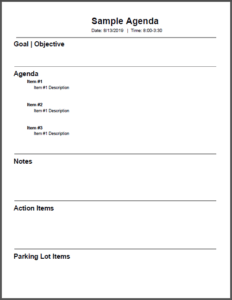
The first “must” for a successful inservice meeting is to have a plan and an agenda in place. Agendas make it easier to stay on track and follow up with important items. When creating your agenda, remember that you want to make effective use of everyone’s time. Be sure to include a section for action items so that everyone can have an overview of what needs to be done.

It is so easy to create your agenda electronically, for example with Google Docs. There are many agenda templates that exist as well. Look at this sample agenda. Once thing you will notice is that it has a place to take collaborative notes. There’s no need to have notes or minutes being taken separately when they can be done on the agenda itself. If you share the agenda with your secretary or even some of your staff members, they can collaboratively take minutes.

Another thing you can do is share or email the agenda to all staff members in advance of the meeting. Invite them to contribute topics or ideas that they think should be added to the agenda. This will show that you value their thoughts and they will be more invested in your time together.


2 - Don’t Do All the Talking


As the principal, you don’t have to do all the talking at the inservice. Allow your staff members to shine by having them lead a part of the meeting. Giving your staff that opportunity will help develop your school leaders as well as build staff morale. You could assign teachers roles, topics, or updates that they will, in turn, share with the entire group. Your teachers will feel empowered by taking a more active part in the inservice. Remember, teachers love to teach, so utilize that when planning your inservice.


3 - Break the Ice


The start of a new school year can be nerve-wracking, not just for students, but for teachers, too. Why not incorporate a fun, getting-to-know you activity? Giving your teachers time to share special facts about themselves or share fun things they did this summer will help ease those nerves. This is also the perfect time to introduce and recognize any staff members who are new and learn a little more about them.

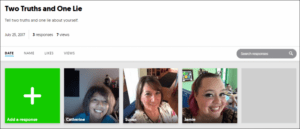
Icebreakers help you build relationships with your staff. Try to use icebreakers that your staff can use with students in the classroom so they can build relationships with their students, too. It never hurts to model what you want to see in the classroom. You can find a few icebreaker activities at Classroom Icebreakers for Back to School and Even More Classroom Icebreakers for Back to School. The great thing about those icebreakers is that they incorporate technology. The ISTE Standards for Administrators say that you should promote and model effective communication and collaboration among stakeholders using digital age tools (ISTE Standard 3c). Digital icebreakers will help you do that.
inservice
Click HERE to see a Two Truths and a Lie Icebreaker.
The password is Icebreaker.


4 - Try Something Different


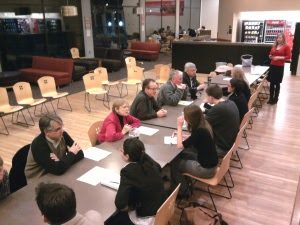
There are so many things you need to cover at the beginning of the year inservice, such as policies and procedures. These aren’t necessarily the most exciting topics to discuss; but nevertheless, they must be covered. Therefore, why not incorporate a little fun into reviewing these less-than exciting topics by using a little variety? Instead of showing a PowerPoint, have the teachers complete a scavenger hunt or some type of game. Have them compete in a smack down or rotate around the room to have quick conversations about specific topics. You can find these ideas and more at Innovative Professional Development Models.
back-to-school inservice
Example of a speed dating professional development activity


5 - Incorporate the Three F’s


Do your best to incorporate the three F’s:
  • Food. Food can have a tremendous impact on the meeting's productivity and outcome. I always liked the saying, “To Meet Better, Eat Better.” You will especially want to provide a snack for your teachers to avoid afternoon slowdowns.
  • Freebies. It’s always a good idea to give your staff something to welcome them back. It could be something like a pen, water bottle, or coffee mug that has the school logo on it. If there aren’t any discretionary funds available for this, then you could make something for them. It’s the thought that counts.
  • Feedback. Feedback is important and we all know it. As mentioned in #1, getting input from your staff will show you value their thoughts and opinions. Make sure you provide opportunities for your staff to speak up during the inservice.


6 – Start with the End and End with the Positive


At the beginning of your inservice, make the goal or objective for coming together very clear. Ensuring that your staff knows what the expected outcomes are will make for a more efficient inservice.

Lastly and most importantly, make sure you end each day on a positive note. Let your staff know how much you appreciate them. Make these days about them and be visible and ready to help them when needed.


Have a Great Inservice


Hopefully, this has given you a few ideas on how to spice up your inservice and get off to a great start. It’s a busy time of the year, so make the first days with your staff count as much as possible.


Tuesday, August 29, 2017

Even More Classroom Icebreakers for Back to School

Try these fun back-to-school icebreakers with your new students and be amazed at how quickly you learn who they are and what they like.
Last year, I wrote a blog about classroom icebreakers that could help students and teachers break the ice the first day or the first week of school. Find even more icebreaker activities below to try with your students in order to start the year off right.

Two Truths and a Lie Flipgrid

If you haven’t caught the Flipgrid Fever (#FlipgridFever), you should! Flipgrid is a video discussion board service that will allow your students to respond to a question you ask. Teachers can create a grid for free just by signing up for an account. It’s a great way to capture your student’s voices and ideas.
A fantastic icebreaker would be to create a Two Truths and a Lie Flipgrid. Give students the URL to your Flipgrid or they can scan the QR code to access it. Your students would then click on the green plus sign and record themselves telling two truths and one lie about themselves. You could even pair students up and have them record each other. After all the students have finished, you can pull the Flipgrid up on the screen and the class can take turns guessing which statement is a lie. It’s a great way for the class to get to know one another. Want to try it? Test it out on this sample Flipgrid I created.
icebreakers

Create Your Own Emoji

Emojis are so popular these days that students are using them all the time. So why not have your students create their own Emoji and then write a paragraph about themselves as an icebreaker activity? Try it out for yourself by following the steps below:
Step 1:
Step 2:icebreakers
  • Read the directions on Slide #1 and pick a slide that doesn’t already have an emoji created on it.
  • Create your emoji by dragging and dropping the images on the side of the slide or by inserting new images.
Step 3:
  • Write a paragraph about yourself and/or why you created your emoji the way you did.
Once again, after all your students have created their emoji, you could display them on the projector and let the students talk about their emoji. Get your own copy of the About Me Emoji template here: “About Me Emoji Google Slide” Template – Google Slide link.

Green Screen LEGO Puppets

Another idea for an icebreaker is to have students use green screen technology while recording a video introduction of themselves.
First, have your students design a LEGO mini figure of themselves. You can give your students this template to use as a starting point.
Next, purchase a green tablecloth at the Dollar store, which you will then tape up on the wall. Then download a green screen app, such as the Doink app. It only costs $2.99 and is very easy to use. For a free option, you can try Touchcast (iPad) or Free Photo Green Screen Tool (iOS). Use your iPad to take a picture that you will use as a background for the green screen. You could take pictures of the front of the school, the playground, or a spot in your classroom. Upload the picture to the app.
Then attach the LEGO puppet to either a green ruler or a green straw (usually available at Starbucks) and place it in front of the green tablecloth. Use the app to record a short video introduction with groups of students. See the example video below:
icebreakers

Animated Fidget Spinner

Fidget spinners are especially popular with our students today. Therefore, why not try using them as an instructional tool in the classroom?
For the icebreaker below, I used animations in Microsoft PowerPoint to allow the spinner to spin and land on different parts of the color wheel. For this particular icebreaker, you can pull the spinner up on the screen and group students into teams in order for them to discuss the topic the spinner lands on. This is great way to connect with students while allowing them to get to know one another.
Get your own copy of the Fidget Spinner Icebreaker template here: “Fidget Spinner Icebreaker” Template – Microsoft PowerPoint Template.
Try one of these icebreakers during the first week of school and give your students and you a chance to get to know one another. Leave a comment below with some of the icebreakers that have worked well for your students.

Friday, August 12, 2016

Classroom Icebreakers for Back to School


The first day of a new school year can be awkward and nerve-wracking for both teachers and students. Why not break the ice that day (or week) with a few, fun, getting-to-know you activities? Giving your students a chance to share special facts about themselves and learn about their teacher at the same time will help ease first-day jitters. And it helps to build a sense of community in the class, an important requirement as they collaborate with each other throughout the year.
Below are some of my favorite icebreaker activities. The activities are fun and easy. Best of all, they help get the first day of school off to the right start. And they don’t require that students take a big risk by speaking in front of everyone or by revealing something too personal.

Emoji Puzzle

Students these days use emoticons all the time. So why not have an icebreaker activity that incorporates them?  As your students enter the classroom, hand them an emoji puzzle piece that will match one other student in the class. After all the students are in the class, have them walk around the classroom and try to find the other student that has the matching emoji puzzle piece.
Once they have found their match, students can interview each other or quietly talk about themselves. Give them some guiding questions, just in case they get stumped for what to talk about. (Have them share birthdays, their favorite snack food, best song to listen to while studying, etc. Just make sure it’s nothing too personal.) You could repeat this activity each day until every student has talked with every other student. If you would like to see a template, check out this one I created in Google Slides. Simply print it out and cut the emojis into puzzle pieces.

Conversation Starter Stones

Conversation Starter Stones are a fantastic way to help your students get to know one another. In addition, they are cheap and easy to make. Drive to your local dollar store and buy some large glass stones. You can find a pack of about 30 stones for one dollar at the Dollar Tree. Next, get some clear glue and scissors. Cut out the starters individually and paste one on the bottom of each stone so that the writing is visible through the stone. Here is a template of conversation starters I use for the stones. This template was created in Google Drawing, so you can simply add it to your drive, edit it, and add your own topics.
Conversation Starter Stones
As your students enter the class, give them a stone. Next, pair them up with another student and have them discuss the topics on their stones. They could even trade stones to keep the conversation going. For an extension activity, have your students create a Google Slide or Office Sway from their starter that could be presented or shared with the entire class or on their blog. You can see examples of completed Sways using the stones here.

QR Code Icebreaker

QR codes are still everywhere and are so easy to create. As you know, once scanned, a QR code can take you directly to a website or reveal images or clues. For this activity, created by TCEA’s own Peggy Reimers, print the QR codes and cut them into four pieces. Give each student one of the four pieces of the code. Next, have your students find their group based on their category. Once in their group, have your students scan the QR code to reveal if their category word is correct. Lastly, ask each student in the group to follow up with their favorite item in the category, such as favorite color, favorite food, etc.

Two Truths and a Lie Padlet

With the Two Truths and a Lie Padlet icebreaker, you must first create a collaborative Padlet. If you have never used Padlet before, it is an online bulletin board and an easy way to get your students to collaborate with each other online. After you have created your blank Padlet, give your students the link and have them add three sentences about themselves (or their summer vacations). Two of the sentences should be true and one should be a lie. Next, each student (including you, teacher!) gets a chance to share their three sentences while the rest of the class takes turns guessing which one is the lie. Take a look at this sample padlet.

All About Me Google Drawing

All About Me Padlet
All About Me Padlet
The All About Me Google Drawing combines two of my favorite tools, Google Drawing and Padlet. Have your students create a Google Drawing from scratch that will share information about themselves. They can add text, images, and links to the Google Drawing as they record facts such as where they are from, favorite sports, hobbies, etc. Once your students have completed their drawing, have them save it as an image and upload it to a collaborative Padlet. If you would like to see an example, take a look at my All About Me Padlet.
As your prepare for the first day of school, don’t forget to try one of these icebreakers. Giving your students the opportunity to get to know one another on day one will make it easier for them to work together the rest of the year.
As always, we love to hear your feedback. Leave a comment below with some of the icebreakers that have worked well for your students.
-----------------------------------------------------------------------------------------
This blog entry was also published at http://tcea.org/blog.