Thursday, September 10, 2015

Apple's Special Event


Apple finally revealed what Siri wouldn’t give us a hint about. Here’s a quick recap of everything you need to know from the keynote.

iPad Pro


After more than a year of rumors, a jumbo-sized iPad has landed! The new iPad Pro brings a slightly larger screen at 12.9 inches, roughly the size of a 13-inch MacBook. The device is powered by a new A9X processor that is 1.8 times faster than Apple’s previous generation chip. It has a four-speaker stereo sound system and is just 6.9mm thick. Best of all, the tablet will last for 10 hours of usage on a single charge.
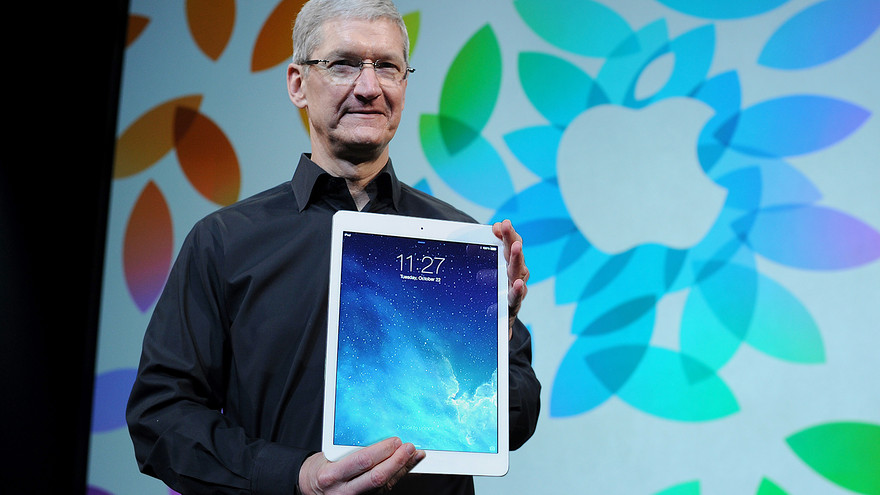
Image Source: : http://goo.gl/nkMbTF


The device was designed to take advantage of the new multitasking features that Apple added to iOS 9 to make it more useful for productivity. Apple’s Phil Schiller said that the iPad Pro offered “desktop-class” performance and that it would enable new types of applications never seen on any previous iPad.


In an unexpected twist, a representative from Microsoft came out on stage to show off a new version of its iconic Office software designed specifically for the new iPad. Microsoft showed off the “multitasking” found in the iPad which allows you to work on two documents at once.


Pricing for the iPad Pro will start at $799 for a 32GB model, $949 for a 128GB model and $1,079 for a 128GB model with LTE connectivity. It will be available sometime in November.


Smart Keyboard

Apple unveiled a brand new keyboard accessory designed specifically for the iPad Pro. It’s basically a cover and keyboard in one. It magnetically connects with a three-port Smart Connector to accommodate landscape typing. The Smart Keyboard will cost $169 and will be available sometime in November.


Apple Pencil

Image Source: http://goo.gl/ADxGzc
In addition to the keyboard, the iPad Pro will also be supported by the new Apple Pencil, which is basically a sleek stylus that is precise and supports force data. Pressing lightly will result in a thin stroke, while a firm press will produce a broader stroke. The Pencil features a Lightning connector that lets you recharge it while hooked up to the tablet. When using the pencil, multiple scans allow for capturing more points in a stroke. The pencil can be used to mark up emails, images and others items directly via select iOS apps. The Apple Pencil will cost $99 and will be available sometime in November.


iPad Mini 4

The iPad Mini 4 will be a slightly thinner version of the third-generation iPad Mini. It contains a faster processor, and it also has a better camera than the iPad Mini 3. The new iPad mini 4, says Apple, packs "the power and performance of the iPad Air 2" into a smaller mini enclosure, which now weighs just 0.65 pounds. Make note that the faster processor and more RAM in the iPad Mini 4 means that it will support “split-screen” apps, which will debut in iOS 9. The iPad Mini 4 will start at $399 for 16GB and is currently available.


iPhone 6S and iPhone 6S Plus

The iPhone 6s and iPhone 6S Plus look practically identical to the current iPhone 6 and iPhone 6 Plus. However, internally they are different. Highlights include Apple’s new 3D Touch technology, faster processors, twice the RAM as last year’s iPhones, new 12-megapixel rear cameras and 5-megapixel front cameras, Live Photos, and a new color option.


  • 3D Touch - Apple has included a variation of Force Touch, called 3D Touch, on the newer versions of the phones, which will call up secondary menus and actions when you press and hold the screen. For example, if you're in your email inbox, applying fingertip pressure to an element in the message will surface more information, like maybe the flight number on an emailed travel itinerary, for instance. Apple called this concept "peeking in" during the live demo.
Image Source: http://goo.gl/sQoA3F

  • Better Cameras - Apple’s new rear camera on the iPhone 6s and iPhone 6s Plus is 12-megapixels. The new phones feature better optics and it can record 4K video as well. The front-facing camera has been upped to 5 megapixels, and it supports full HD video as well as selfie panoramas. Both new cameras include a new software-based flash feature that should improve low-light photography.

  • Live Photos - When the iPhone 6s captures a standard photo, it also records a brief video automatically in the background. Simply force touch on any photo in your camera roll and you’ll see the brief animation play.

  • A New Color - The iPhones will now come in a new color, called rose gold. It basically looks like a blush pink, same as the new Apple Watch color option.

  • Hey Siri - With a new setting enabled, Siri will always be listening for the “hey Siri” trigger, even when the iPhone’s display is off. Earlier iPhone models have a similar feature, but the phone needed to be plugged in for Siri to listen.


  • New Touch ID - The new iPhones will include a brand new Touch ID sensor that Apple says is twice as fast as the scanner in the iPhone 6.


Apple’s new iPhone 6s and iPhone 6s Plus will be available for preorder on September 12, with phone arriving in stores on September 25. On a two-year contract, the iPhone 6S starts at $199 for the 16GB model, and moves up to $299 for 64GB and $399 for 128GB. The iPhone 6S Plus 16GB model starts at $299, and costs $399 for 64GB and $499 for 128GB.


iPhone Upgrade Program

With Apple’s new iPhone upgrade program, you can now buy a new unlocked iPhone from Apple starting at $32 a month, and you’ll be able to trade it in next year and get the same tier iPhone at the same price with no lump payments.


Apple TV

The next-generation Apple TV will ship with a completely redesigned remote with touch controls and sensors that allow for motion controls. It’s powered by the 64-bit A8 chip and it’s the same size as the old Apple TV. The highlight is the fact that Apple is opening its TV platform up to third-party app and game developers with the new tvOS platform.

The remote is also a big component of the new Apple TV, featuring a menu button, a TV button, a Siri button and more. But the key feature is the glass touch surface, giving users the ability to scroll through a menu without having to tap or hold down any buttons. You can click and swipe to fast forward or rewind through shows as well.

Siri can be used to control Apple TV now as well, allowing users to ask Siri to find whatever they’re in the mood for, be it a new movie, a great game or live sports. You can also ask Siri about movies and TV shows (or basically anything you can think of) while you’re watching. Siri will show an update at the bottom of the screen without interrupting the show or movie.

The new Apple TV will be available in October at $149 with 32GB of storage and $199 with 64GB of storage.


Apple Watch
Image Source: http://goo.gl/ZDcmtF

Apple announced new own-brand bands for the watch, new fashion partnerships for third-party bands, new Apple Sport colors, and it also shared details surrounding WatchOS 2’s upcoming release.

According to Tim Cook, the Watch has a 97% satisfaction rate so far. Examples of new apps coming to the watch include Facebook Messenger and an app that lets you control your GoPro camera from your wrist.

Beyond software, Apple announced a partnership with Hermes to bring a whole new range of bands to the Apple Watch. Bands will become available in select stores starting next month.

The company also announced two new colors for the aluminum Apple Watch Sport: gold and rose gold. Both new colors are available beginning today. There will also be new bands that accompany the new colors, and the Stainless Apple Watch will get a few new bands as well. Lastly, there will be a whole new range of Sport bands in fall colors, and WatchOS 2 will be released on September 16. 

iOS 9

Apple's new operating system, iOS 9 will include split-screen apps, a smarter Siri, content blockers for Safari and more. It will be released to the general public on September 16.

Wednesday, May 27, 2015

Hosting a Twitter Chat


A few weeks ago, a colleague asked me to co-host a Twitter chat with him. Never having done so before, I began investigating what it entails to host a productive Twitter chat. It is unbelievable the amount of information you can find about hosting a chat as well as participating in a chat.

What is a Twitter chat?

A Twitter chat is a public Twitter conversation that uses a unique hashtag (#). The hashtag allows you to follow the discussion and participate in it. Twitter chats usually occur at a pre-determined time in order to discuss specific topics and to connect people with similar interests.

Usually the host or moderator of the chat will post questions (with Q1, Q2, etc.) in order to prompt responses from participants (who use A1, A2, etc.).  Most Twitter chats last an hour.

Why participate in a Twitter chat?

I recently participated in a Twitter chat held by Teachers Leading (#teachersleading). My reasons for participating in the chat were simple. I wanted a chance to network with others who shared my same interests and I simply wanted to learn from them.


What are some tips for hosting your own Twitter chat?


Tip #1: Participate in chats first and understand how they work
Since I have been a participant in Twitter chats before, I really feel like I understand how they work. It is very important that you know how a Twitter chat works in order to successfully host your own. If you are looking for some chats to participate in, you can find some listed at the links below:


Tip #2: Make a plan
When hosting a Twitter chat, some items need to be pre-planned. These items include:
  • Choose a hashtag - When choosing a hashtag, it needs to be short and unique. It is also helpful if it is easy to remember and easy to type.

  • Schedule a time and day - Choose a time and day that works best for you. You might also want to ensure that no other major Twitter chats about the same topic are occurring on the day and time you pick. Also, when selecting a time, think about your audience.

  • Choose a topic and create questions - Once you decide upon a topic, come up with 5-8 questions that will be used to guide the chat. It wouldn't hurt to add a few additional questions just in case you need to increase interaction among the participants.

  • Consider inviting special guests - Bringing in guests on a particular topic is a great way to get first-hand knowledge and expertise for your chat participants. Make sure you clearly communicate the chat schedule with them and send them the questions in advance so that they may see and offer input on them.


Tip #3: Promote your chat
Promote your chat using social media. In addition, creating an announcement webpage, like a Google Site, to use as a reference point is always a good idea. This page can serve as a landing page that explains what the chat will be about and gives the details about the chat. In addition, it can contains things like how to participate in a chat, how chats work, etc. Some of your participants might find this very useful.


Tip #4: Conduct your chat
When conducting your chat, think about including these items:
  • Include introductions - Welcome your participants to the chat and allow them to introduce themselves.
  • Announce the topic - Announce what the topic is for the chat and tweet your own ideas about the topic.
  • Ask questions - As you ask questions, label them as Q1, Q2, etc. Allow your participants at least 5 minutes to share their ideas.
  • Encourage participation - Share some related resources, links, and ask your participants to do the same.
  • Announce the end of the chat - Warn the participants that the chat will be ending.
  • Conclude the chat - Thank your participants for participating in the chat and tweet any final remarks or thoughts. Also, announce the next chat day, time and topic.
Some great tools to conduct your chat on are Hootsuite and Tweetdeck. These Twitter clients make it easier to follow the chat.


Tip #5: Analyze and archive your chat
After your chat is over, reflect upon how the experience went. Perhaps, write a blog entry about it. Also you might want to create a transcript of your tweets. Storify is a great tool to use for this.


Digital Coaching Twitter Chat
So, if you aren't busy tomorrow evening, join me as I co-host my first twitter chat:

Date: Thursday, May 28, 2015
Time: 8pm - 9pm
Hashtag: #edtechcoach
Topic: Digital Coaching Stories 


Monday, March 30, 2015

Differentiated Instructional Strategies - Ch. 3

Below are my notes from Chapter 3 of:

Differentiated Instructional Strategies - One Size Doesn't Fit All
by Gayle H. Gregory & Carolyn Chapman


Chapter 3 - Knowing the Learner


The fact is that we all learn in different ways, process information differently, and have distinct preferences about where, when, and how we learn.

Learning Profiles

A learning profile is a compilation of data to identify and share the ways in which each student learns.

Sweet Spot

In the sports realm, the term "sweet spot" refers to the point or area on a bat, club, or racket at which it makes most effective contact with the ball or a place where a commination of factors result in a maximum response for a given amount of effort.

It is imperative that teachers find the "sweet spot" that will connect the learners with new learning.

To identify the sweet spot, teachers should:
  • Create and use surveys or inventories
  • Make observations and notes
  • Cast a broad set of opportunities so students can find their niche
  • Provide strategies so students can reflect on their choices

Seven Categories

Seven categories should be considered to capture student preferences:

1. Differences in learning
  • How do students access, process, and express information?

2. Differences in sensory-based learning
  • Is the student an auditory, visual, or tactile learning?

3. Differences in thinking
  • Which style of thinking do your students have:
    • Gregorc:
      • Concrete Random Thinkers
      • Concrete Sequential Thinkers
      • Abstract Sequential Thinkers
      • Abstract Random Thinkers
    • McCarthy/4MAT
      • Dynamic Learner
      • Commonsense Learner
      • Analytical Learner
      • Imaginative Learner

4. Differences in multiple intelligences
  • Verbal/Linguistic
  • Logical/Mathematical
  • Visual/Spatial
  • Musical/Rhythmic
  • Bodily/Kinesthetic
  • Interpersonal
  • Intrapersonal
  • Naturalistic

5. Gender differences
  • Provide opportunities for gender-alike groups
  • Recognize that girls pay attention and can listen longer than boys
  • Provide movement
  • Connect more at a verbal, emotional level for girls
  • Provide healthy competition

6. Cultural differences
  • It is important that we recognize our students' culture and make an effort to understand their beliefs, values, attitudes, and norms.

7. Students' interests
  • It is important to connect and relate to what students are learning in their world.

Other factors to consider:
  • Noise level - Do students prefer noise or quiet?
  • Design structure - What is the arrangement of the room?
  • Motivation and persistence - Are students able to engage for long or short periods of time?
  • Responsibility - Are they independent or do they need guidance?
  • Structure - Do they prefer to have more flexibility or do they need more detail?
  • Individual/Peer - Do they like to work worth others or do they prefer to leave alone?


Wednesday, March 11, 2015

Microsoft Office Sway

Below is my first attempt at creating a Microsoft Office Sway

Website: https://sway.com/

What is Sway?

Sway is a new way to show content. It is like a one page website that can be published and shared anywhere in the world.

Ways to Use Sway:

  1. Presentations
  2. Picture Books
  3. Reports
  4. Display Artwork
  5. Book Reviews
  6. Portfolios

My First Attempt: https://sway.com/1rTA7JjXeznQilud


Differentiated Instructional Strategies - Ch. 1 & 2

Below are my notes from Chapter 1 and Chapter 2 of:

Differentiated Instructional Strategies - One Size Doesn't Fit All
by Gayle H. Gregory & Carolyn Chapman
http://goo.gl/pvYu6F


Chapter 1 - One Size Doesn't Fit All

As with clothing, one size doesn't fit all, so in classrooms one way is not the only way.
The challenge is how to reach the individual needs of each students.
Students bring their interests, personal experiences, and attitudes to each learning moment of every day in a classroom.
How does a teacher reach the diverse needs in a classroom today?

For years, we have planned the same lesson and taught it to all - knowing that we were boring some and losing others because they were not ready for that learning.

The standards and the needs of students should determine instructional decisions. Programs, materials, and resources should not determine the curriculum and instruction.

The mindset of teachers who are differentiating:
  1. All students have areas of strength.
  2.  All students have areas that need to be strengthened.
  3. Each student's brain is as unique as a fingerprint.
  4. It is never to late to learn.
  5. When beginning a new topic, students bring their prior knowledge base and experience to the learning.
  6. Emotions, feelings, and attitudes affect learning.
  7. All students can learn.
  8. Students learn in different ways at different times.

The Differentiated Classroom

A differentiated classroom is one in which the teacher responds to the unique needs of students.

Teachers can effectively differentiate the following:
  • Content
  • Assessment Tools
  • Performance Tasks
  • Instructional Strategies

Why Differentiate?

Through differentiation, we give all our students the opportunity to learn to their full potential.

Planning for Differentiating Instruction

  1. Establish what needs to be taught. Develop essential questions.
  2. Identify the content.
  3. Activate. Determine what students know and what they need to learn. Assess prior knowledge.
  4. Acquire. Decide what new knowledge and skills student need to learn and how they will acquire them to the level of understanding.
  5. Apply and Adjust. Give students the opportunity to practice and become actively engaged with the new learning.
  6. Assess. Have students demonstrate their knowledge. 

------------------------------------------------------------------------------------------

Chapter 2 - Creating a Climate for Learning


What Do Learners Need to Succeed?

For students to succeed, they need to believe that they can learn and that what they are learning is useful, relevant, and meaningful for them.

A teacher's mindset influences students' mindsets. Everything we say and do should give the message of possibility and influence the students' perception of their capabilities while fostering optimism and tenacity.


Classroom Culture and Learning Communities

Culture many not necessarily be conveyed only through words, but also through actions. Sometimes what we do screams so loudly that we can't hear what is being said.

Each learner must know that he or she is an important contributing member of the classroom.

Emotions and Learning

Students living in fear cannot learn.

Emotional intelligence is a person's ability to use his or her emotions intelligently.

Self-awareness is one's ability to sense and name a feeling when it happens.

Managing emotions is recognizing and labeling feelings and responding appropriately

Self-motivation is defined as competencies such as persistence, goal setting, and delaying gratification

Empathy is the ability to feel for another person.

Social skills are competencies that one used to "read" and manage emotional interactions.

Classroom Climate

In a differentiated classroom, students feel safe and secure enough to take risks and express their understanding or lack of understanding.

In a differentiated classroom, the emphasis is on knowledge base and experience rather than IQ or ability.

Learning includes weeding out what students know with effective pre-assessments and ongoing formative assessments.

Use pictures and music to enhance the classroom climate.

Celebrate learning.

-------------------------------------------------------------------------------------------------

Reflections:

Brainstorm ways you meet the individual needs of students.

Take a personal inventory of your use of differentiated instruction.


What are some ways you can create a classroom atmosphere in which students feel safe and can take intellectual risks?

How can you create an inclusive atmosphere in which students feel safe and included?


Tuesday, July 8, 2014

Giveaway Winners - Moodle Course Design eBook


Earlier this week, in this blog entry, I shared a Giveaway for Packt Publishing's Moodle Course Design Best Practices!
Here are the winners of the ebook:
  1. Heather Askea
  2. Miguel Mini Olivera
  3. Miguel Guhlin
Thank you to everyone who commented on the book and Congratulations to the winners!

A representative from Packt Publishing will be emailing you the details on how to get your ebook.

Thursday, June 26, 2014

Win Free Copies of the new book – Moodle Course Design Best Practices

You will be pleased to know that I have teamed up with Packt Publishing to organize a Giveaway of the new book that I recently reviewed - Moodle Course Design Best PracticesBeing a technical reviewer on the book was a fabulous experience!
 
Three lucky winners stand a chance to win a digital copy of this book. Keep reading to find out how you can be one of the Lucky Winners.
 
Overview of Book:
·        Set up a template for a series of courses
·        Design the appearance of your course
·        Manage the resources and activities of your course
·        Organize your course content effectively
·        Set up instructional materials for your course
·        Select and set up assessments
·        Include effective instructional strategies in your course
·        Archive your course content for re-use
 
How do I Enter?
All you need to do is head on over to the book page and look through the product description of the book and drop a line via the comments below this post to let me know what interests you the most about this book. It’s that simple. I will enter your name on Random Name Picker and winners will get an e-copy of the book!
 
What is the Deadline?
The contest will close at midnight on Thursday, July 3, 2014.
Winners will be contacted by email, so be sure to use your real email address when you comment!

Tuesday, April 8, 2014

Texas Education Agency (TEA) Update

At a recent Technology Coordinators Special Interest Group (TEC-Sig) Meeting, I had the opportunity to attend an update conducted by the Texas Education Agency (TEA).

Some of the agenda items discussed included:
  • Federal/State News
  • Educational Technology Planning
  • Texas SUCCESS
  • Texas Student Data System

My notes from the meeting can be found at the link below:

TEA Update Notes 03.28.14

In addition, you can listen to the presentation at the link below:

TEA Update Audio 03.28.14 (mp3)


Tuesday, March 11, 2014

What Keeps School CTOs Up At Night?


Notes from SxSWedu 2014 Session

Title: What Keeps School CTOs Up At Night

Panelists:
·       Sheryl Abshire, CTO, Calcasieu Parish Public Schools, Lake Charles, LA
·       Donna Williamson, Technology Director, Mountain Brook City Board of Education,  Birmingham, AL
·        Michael Jamerson, Director of Technology, Bartholomew Consolidated School Corp, Columbus, IN
 
Moderator:
·         Keith Kreuger, CEO, Consortium for School Networking (CoSN)


Description:
Hear from leading school district CIO/CTOs about the key issues that are shaping the use of technology in the classroom. Learn about key trends—allowing students to bring their own devices to preparing for online tests to bridging learning inside the classroom to the home, and more—that are driving the need for broadband and wireless in education. The session will be of interest to practitioners and policy makers, as well as entrepreneurs developing innovative solutions for pressing needs.
 
CTO’s top three priorities include:
 
·         Bring Your Own Device (BYOD)
·         Assessment Readiness
·         Broadband Access

After listening to the panelists, it was clear that all worry about internet access. CoSN reported that a majority of school aren’t network ready and that 99% of districts will need additional internet bandwidth and connectivity in the next 3 months. Jamerson stated, "It costs about $2000 per classroom to provide internet access capacity."

In addition, access outside of school is a concern. The panelists reported that less than 50% of families have high speed internet access at home.

I think Donna Williamson said it best when she stated that what keeps her up at night is “The rate in which everything is changing and the ability to keep up with it.” She mentioned everything from data security, cyberbullying, online curriculum to internet access. In regards to data security, developing policies and procedures and communicating those to parents is a challenge.  Protecting student data starts with educating teachers on how to protect data the right way. It doesn't mean limiting access.

How can a CTO balance all the resources while keeping the data secure?

Abshire stated, “Our role (as a CTO) is to say yes and figure out how we can do it. It’s better to say yes and, rather than yes but.”


Keith Kreuger, CEO of CoSN, gave an overview of items to be on the lookout for, which include:
·         Cloud Computing
·         Mobile Learning
·         Open Content
·         Learning Analytics
·         3D Printing

COSN has created a new resource that defines the specifications for a district network that can keep up with current and future instructional and learning requirements. The Smart Education Networks by Design (SEND) Guidelines and Checklist are free for download and are located at http://www.cosn.org/focus-areas/it-management/send-smart-education-networks-design. For example, the guidelines recommend four major steps when planning a personalized learning environment, a 1-1 computing environment or a bring-your-own-device program:
1.    Build a scalable network.
2.    Work with the curriculum team to take advantage of curriculum that can be used on computing devices.
3.    Train teachers and administrators at least six months before giving students devices.
4.    Talk with parents, the school board, local government agencies, businesses and elected officials who could assist schools.
 
http://www.cosn.org/focus-areas/it-management/send-smart-education-networks-design
 

In addition, CoSN is creating a Becoming Assessment Ready: Raising the Bar toolkit, which contains steps that schools and districts can take to ensure that their IT is ready to handle online assessments. The toolkit is located online at http://www.cosn.org/focus-areas/it-management/becoming-assessment-ready.


http://www.cosn.org/focus-areas/it-management/becoming-assessment-ready


On the horizon is a toolkit about privacy, especially in the cloud computing environment. Data offers the potential to personalize learning, inform instruction and offer real-time feedback to students and teachers, but to reach that potential, educators must understand the legal, as well as the expectations of parents and the community that data is protected from inappropriate usage. 

Ultimately, it is clear that as more computing devices land on campuses, CTOs are trying to keep their networks up to speed so they can handle the increased load.

If you are a technology leader, what keeps you up at night?


Bridging the Digital Divide: BYOD Equity


Notes from SxSWedu 2014 Session

Title: Bridging the Digital Divide: BYOD Equity (#BYODEquity)

Panelists:

·         Sandy Kendall, Georgetown ISD, @EdTechSandyK

·         Jessica Herring, Benton Middle School, @JessicaRae929

·         Tim Clark, Forsyth County Schools, @BYOTNetwork

·         Michael Mills, University of Central Arkansas, @AquiAmigo


Description:
Many school districts are encouraging BYOD as a way to address the growing need for technology tools that transform learning experiences, especially for those students who do not have access to personal technology resources. This panel will discuss the implications of the digital divide and will also share specific experiences of how personal technology devices have improved educational equity through proactive district policies, engaging classroom instruction, and community resources.


The session opened with Sandy Kendall explaining the difference between Equality and Equity. Equality is where every student gets the same tool whether they need it or not. Equity is where only the students that need a device get them. The image below is a fantastic visual of the difference.
 

Dr. Tim Clark shared how his district moved away from an Acceptable Use Policy to Responsible Use Guidelines, which contain 5 guidelines that rely on TRUST. He stated that the Forsyth Digital Equity Task Force, composed of educators, administrators, and community stakeholders was key for gaining support. With BYOD, Tim mentioned that
teachers need to focus on asking great questions, and then have students develop products based on those questions. Rigorous instruction is needed.


Michael Mills shared that BYOD is about a change in teachers’ mentality and administrators’ mentality. He stated, “
It (BYOD) is more than devices and bandwidth, it comes down to teachers and administrators mindset and will." In addition, he mentioned that teachers need to trust their students and many teachers simply don’t.

Jessica Herring shared how she piloted BYOD in her classroom. She mentioned that Engagement Equity is needed, which includes first leveraging the novelty of BYOD and then the utility of BYOD. Establishing equitable and trusting relationships is important. Central Office Administrators and Principals alike, must trust their teachers as well. When asked about classroom management, Jessica stated,”A big part of BYOD classroom management is setting routines for students.”

Sandy Kendall mentioned that more professional development and more opportunities to learn would help teachers with BYOD.BYOD is paradigm shift: A campus support person, that can model and co-plan with teachers, is key to success. Teachers need someone on campus support them though the process. Georgetown ISD’s BYOD resources can be found at http://www.georgetownisd.org/byod. They were adapted from East Central ISD’s BYOT resources.

Overall, I was very impressed with the session and the panelists. They are truly remarkable educators and it was great to hear the perspectives on BYOD from all of them.